 LUMASTAGE
A ProPresenter alternative for Mac, without the subscription
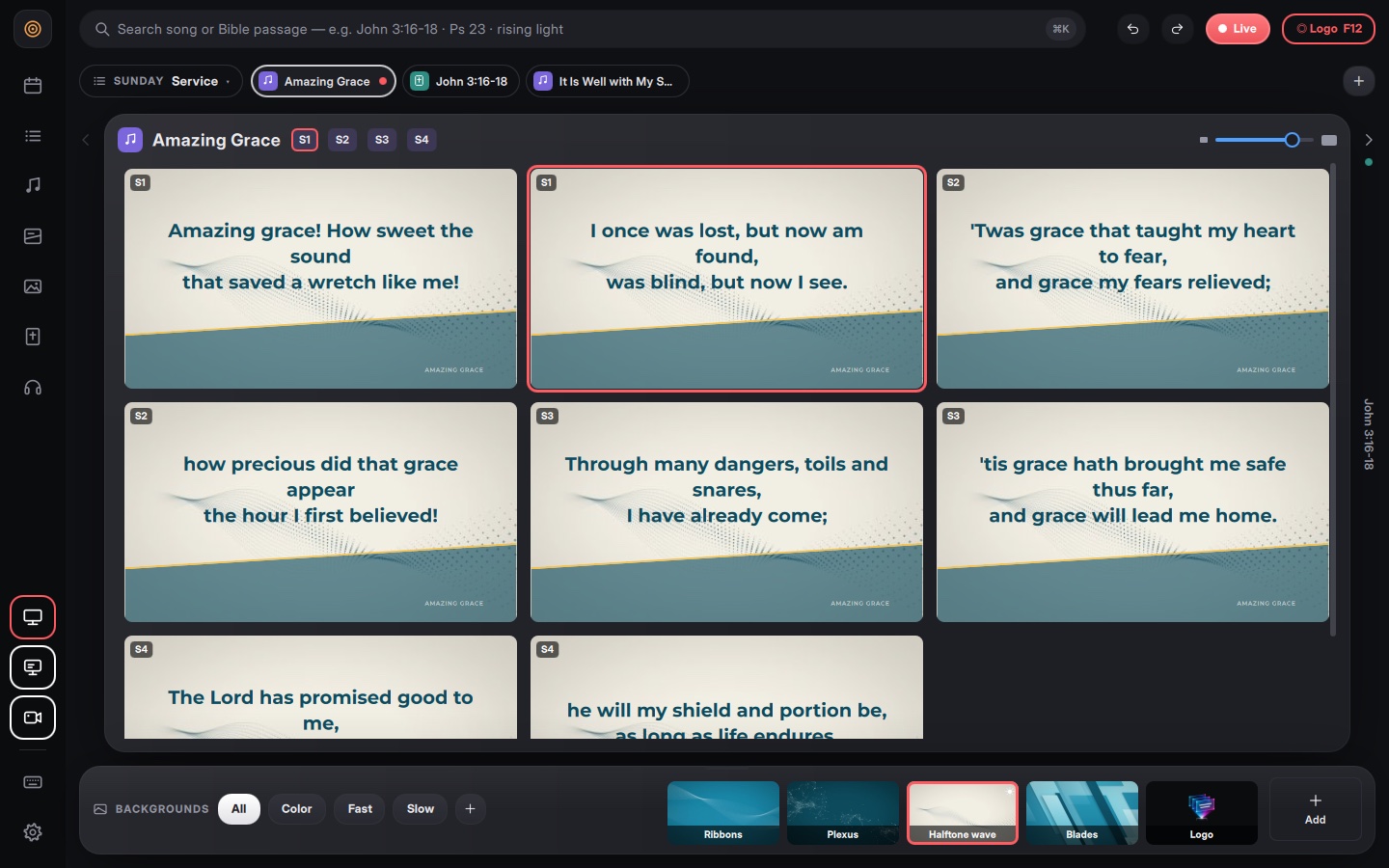
Lumastage is a Mac app built for the volunteer in the booth on Sunday: lyrics, Bible passages, slides, video and a stage display in one window. You pay once, it runs offline, and it brings along the songs you already have in ProPresenter.
€40.98 + VAT per Mac · pay once · 2‑day trial with every feature
Why churches look for a ProPresenter alternative
ProPresenter is one of the most widely used tools in churches, and it does a lot. Since it became subscription‑only for new users, though, many small and mid‑sized churches take a closer look before signing up.
- A cost that comes back every year. Official pricing starts at $29 a month or $289 a year per seat. For a church with one Mac in the booth, that's a recurring line in the budget.
- What happens if you stop paying. According to Renewed Vision, new subscribers who cancel lose access to the software at the end of the paid period.
- The Mac in the booth. The current ProPresenter needs macOS 13.5 or later. Plenty of booths run an older Mac that stops short of that.
- Volunteers. The person running slides changes from week to week, so the software has to be learnable in minutes.
If that sounds like your church, Lumastage was made for you.
What Lumastage does
Lyrics
Every slide of the song in front of you, big and readable. One click puts it on screen with a fade; the arrow key moves on.
Bible
Type “john 3:16” or “ps 23” and Lumastage splits the passage into slides with the right reference. KJV and WEB included, even offline.
Slides, PowerPoint and PDF
Your .pptx and PDF files become slides even without Office; Keynote goes through the Mac's Keynote app.
Video and looping backgrounds
Swap motion backgrounds on the fly with a fade without touching the lyrics; video and images on their own layer.
Stage display
For singers and preacher: current and next lyric, clock, timers and messages from the booth.
Phone remote
A PIN‑protected web page on the church network: no app to install.
F12 panic key
Something went wrong? F12 clears everything and shows your church logo. From your phone too.
Lyrics for the live stream
An output for OBS and vMix on green, on black or transparent through OMT and Syphon.
The interface comes in six languages (English, Italian, Spanish, Portuguese, German, French). It runs on macOS 12 Monterey or later, on Apple silicon and on Intel Macs from around 2015 with 8 GB of memory.
Lumastage vs ProPresenter
Facts only. ProPresenter pricing and requirements come from Renewed Vision's official pages (sources below the table).
| Lumastage | ProPresenter | |
|---|---|---|
| Licence | Lifetime, paid once; all version 1 updates included | Monthly or yearly subscription (the only option for new users) |
| Price | €40.98 + VAT per Mac | $29/month or $289/year per seat; yearly volume pricing from 2 seats |
| If you stop paying | Nothing to renew: it keeps working | For new users, access ends when the paid period runs out |
| Free trial | 2 days, every feature | 14 days |
| Refunds | 14 days, no questions asked | Not stated on the pages we checked |
| Platforms | macOS 12 or later; Windows in the works | macOS 13.5 or later; Windows 10 (1903) or later |
| Internet | Only for the trial and licence activation | To install, register, verify the subscription and update; not to run it |
| Import from ProPresenter | Yes, libraries and .pro files | Native format |
ProPresenter details checked on 29 October 2026, prices in US dollars as published by Renewed Vision: ProPresenter page, pricing and renewals, subscription, system requirements. Subject to change.
Where ProPresenter is still stronger
To be fair: ProPresenter runs on Windows today, includes cloud storage (50 GB with every subscription) so a team can prepare playlists from several computers, manages multiple seats for teams, and offers support 7 days a week. If you run several campuses, a large tech team or complex productions, it may still be the right fit.
Lumastage aims at something else: a simple booth on one Mac that a volunteer learns in minutes, at a price you pay once.
Switching from ProPresenter
Switching software doesn't mean retyping years of songs. Lumastage imports ProPresenter libraries, OpenLyrics files and pasted text.
- Download Lumastage and start the free 2‑day trial on the booth Mac.
- Find your ProPresenter library. On a Mac it usually lives in your Documents folder, in a folder named after ProPresenter.
- Import the .pro files into Lumastage: your songs land in the library, ready for the setlist.
- Add the rest: PowerPoint or PDF announcements, Keynote decks, videos and backgrounds.
- Run a full Sunday before you decide. And if Lumastage isn't right for you, you still have 14 days after purchase to ask for a refund.
Rights to project song lyrics (for example a CCLI licence) remain your church's responsibility, whatever software you use.
Pricing
- Lifetime licence, no subscription
- All version 1 updates included
- Move it to another Mac whenever you like
- 2‑day free trial, 14 days to ask for a refund
Payment is handled by Gumroad, which issues the receipt and adds your country's VAT before you pay. For several Macs, pick the quantity on the purchase page.
Other Mac options
If your budget is zero, there are also free, open‑source programs that run on Mac, such as FreeShow and OpenLP. They're worth a try. Lumastage is a native Mac app, signed and notarized by Apple, with public‑domain Bibles in six languages built in and direct email support from the developer.
Frequently asked questions
Can Lumastage import my songs from ProPresenter?
Yes. Lumastage imports ProPresenter libraries (.pro files), OpenLyrics files and pasted text. PowerPoint and PDF become slides even without Office, and Keynote goes through the Mac's Keynote app.
Do I need a subscription?
No. Lumastage is a one‑time purchase: €40.98 + VAT per Mac, with every version 1 update included. A future version 2 may be sold separately, but version 1 will keep working.
Does it work offline?
Yes. You only need the Internet for the trial and to activate the licence. After that the booth runs without Wi‑Fi: when you're online the licence renews quietly in the background, and when you're not, Lumastage keeps working.
Which Bibles are included?
Public‑domain translations in six languages, including the KJV and the World English Bible. Copyrighted versions aren't included, but you can paste passages if you have the rights, and Lumastage splits them into slides with the right reference.
Can I send lyrics to OBS or vMix for the live stream?
Yes. Lumastage has a dedicated output for video production with lyrics on green, on black or transparent through OMT and Syphon.
Which Macs does it run on? Is there a Windows version?
macOS 12 Monterey or later, on Apple silicon or on Intel Macs from around 2015 with 8 GB of memory. A Windows version is in the works.
Try Lumastage this Sunday.
Download it, import your songs from ProPresenter and use every feature free for 2 days. If you like it, it's €40.98 + VAT, once.
Questions about the licence, buying or switching from ProPresenter? Write to lumastage@vitomarinelli.it